RetouchPi PSD Editor: Open, Edit and Save Layered PSD Files
"Edit psd online" usually answers with a flattened export. This page answers with a different kind of evidence: late on 2026-10-09 a real design file of 40,082,770 bytes, 26 layer rows and 3 groups was opened in one browser (292 ms), one layer edited, saved back (39,651,513 bytes / 207 ms) and reopened (261 ms) - and the saved copy, read back against the PSD container's own header layout, parses into 29 layer records.
Updated 2026-10-09 · ~ 1954 words
Hand it the PSD
Pick one and you land in the editor - no account, no credits up front. .psd is allowed through the file picker; PSB and 32 bits per channel say by name why they will not open, and 16-bit files open but narrow to 8 bits on read.
Four steps: open, read, edit, save layered
- Pick the PSD in the well at the top of this page, or inside the editor use File ▸ Open. A sample in the 40 MB range entered the editor in 292 ms.
- Read the structure in the Layers panel: folded groups open from the triangle at the head of the row, the eye is visibility, and the name box edits in place. The sample unfolds to 26 rows and 3 groups.
- Make your edits: rename, hide, reorder, add masks and layer styles. The round-trip measurement changed the first two - which are also the two a save is most likely to lose.
- Take it out: File ▸ Save as PSD saves layered; export PNG / JPEG / WebP only when the file is meant to be looked at, since those three flatten onto the background colour.
What a layered PSD looks like once it is open
A flattened picture is one array of pixels; a layered PSD is a column of rectangles, each with its own name, visibility and blend mode. The difference is not on the canvas - the canvas looks identical - it is in the Layers panel at the right: this page's sample opens as 26 layer rows and 3 groups, the groups folded until you open the triangle at the head of the row.
- A row is a layer, and a group is a row too. Every row carries an eye icon (visibility), a thumbnail and a name box; a group row adds a triangle and a collapse control, and only when it is open do you see the rows it holds.
- The name box edits in place. That is exactly what the round-trip measurement did: select a row, type a token you will recognise, save, reopen - the name is still there.
- Switching the eye off is not deleting. The row stays in the panel and in the file; it simply stops painting onto the canvas, and one more click on the eye brings it back.
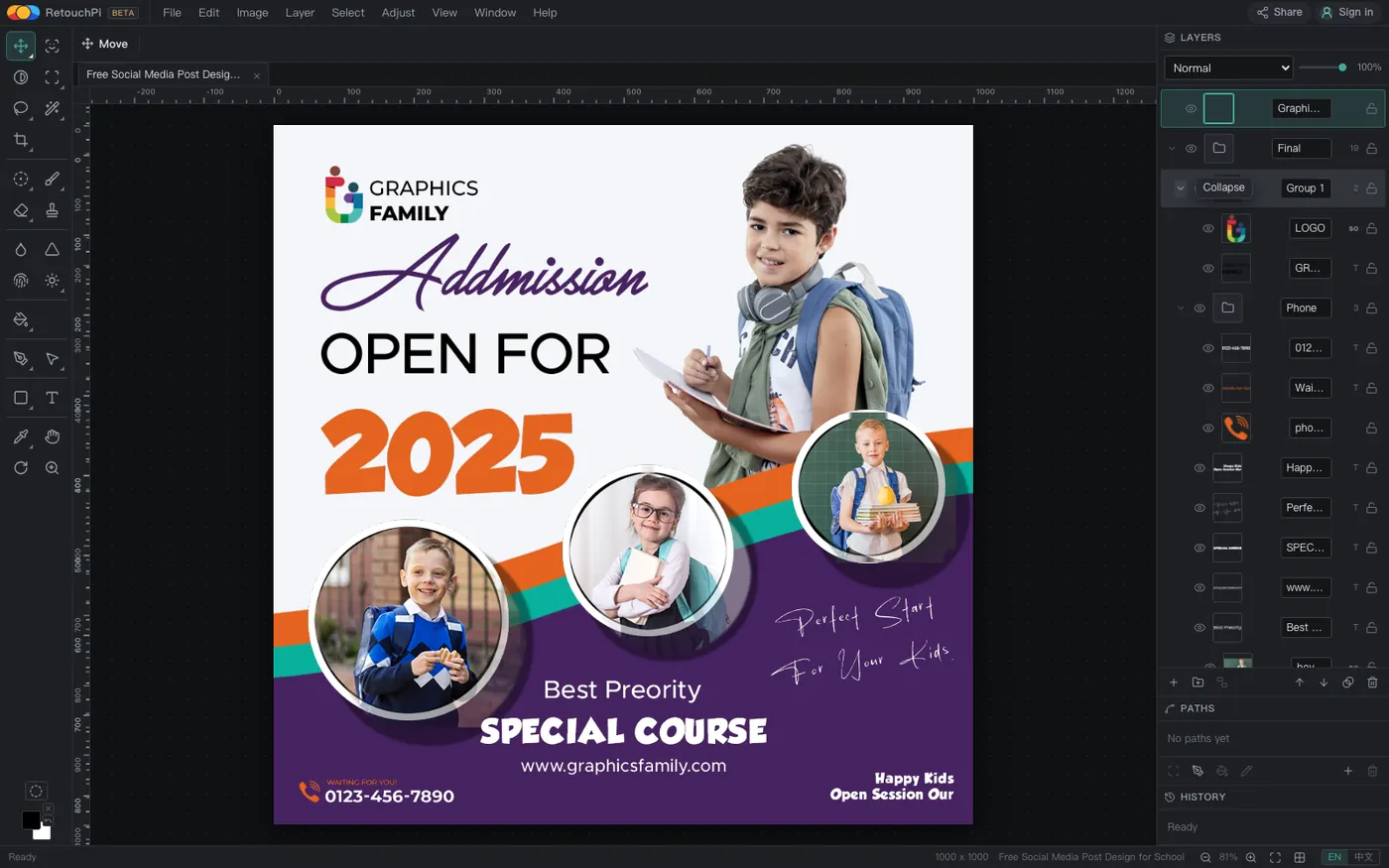
Final and Group 1 groups start folded and open from the triangle at the head of the row.The sample is a real design file (an admission poster, 1000 x 1000, 8-bit RGB), not a three-layer file made for a demo - among the 26 rows are colour shapes, circular photos and text rows, which is what somebody else's working file actually looks like.
Open, edit, save, reopen: the four measured readings
The table below was run back to back on one machine, in one bundled Chromium, late on 2026-10-09. The timings are probe timestamps taken around each step rather than numbers copied from a spec sheet, and the sizes are the real byte counts of the files on disk.
| Step | Measured | What to look at |
|---|---|---|
| Open the 40,082,770-byte layered PSD | 292 ms | The tab name and the 1000 x 1000 in the status bar |
| Count rows after unfolding the folded groups | 26 rows / 3 groups | Groups are rows too, told by the triangle at the head |
| Edit one layer: rename it, then hide another | - | One eye fewer in the panel |
| File ▸ Save as PSD | 39,651,513 B in 207 ms | Saved as a new file, original untouched |
| Reopen the saved copy | 261 ms | Same counts; what was hidden stays hidden |
The same run in the Chinese interface: open 293 ms, save 235 ms, reopen 260 ms - the same order of magnitude, nothing stuck.
Is the saved copy still layered
This is the only question the page really has to answer, because a flattened save can also call itself a PSD. So the saved file was read back field by field against the PSD container's own header layout: 8BPS version 1, 1000 x 1000, 4 channels, 8-bit RGB, and 29 layer records in the layer and mask section - 26 layers plus 3 group divider records, exactly the 26 rows and 3 groups counted in the panel; the rename token sits in the luni (Unicode layer name) field.
- The gap between 29 and 26 is the three group dividers. A group shows as one row in the panel but lives in the file as an opening record plus a
</Layer group>divider; the counts matching is what says the saved structure is the one you were looking at. - Visibility is a bit in the record, not a rendering trick. After reopening, the hidden row still has no eye icon - had the save flattened visibility, every row would come back lit.
- The size moves from 40,082,770 to 39,651,513 bytes. What disappears is ancillary data in the original that this editor does not write back; not one layer, group or mask is missing.
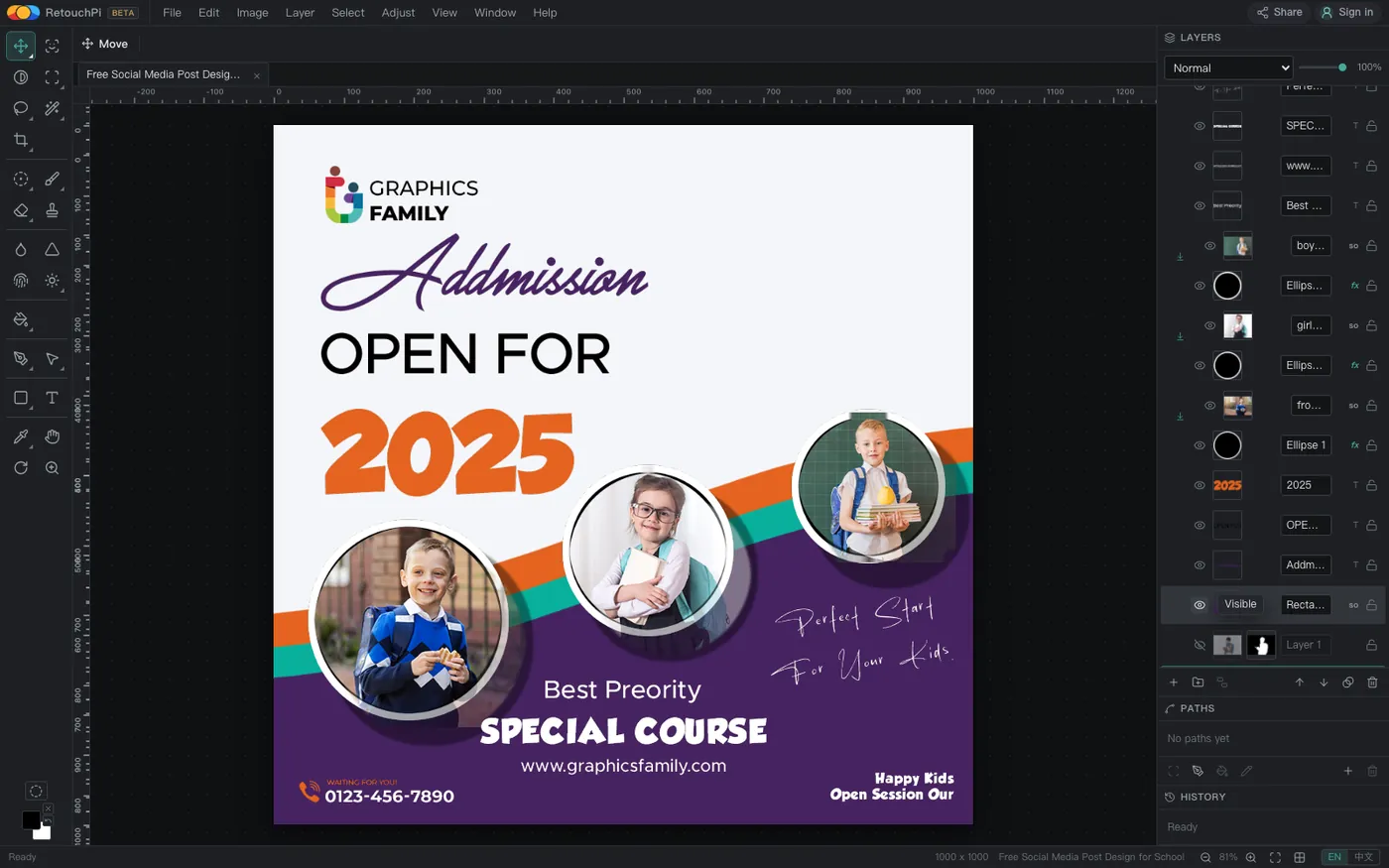
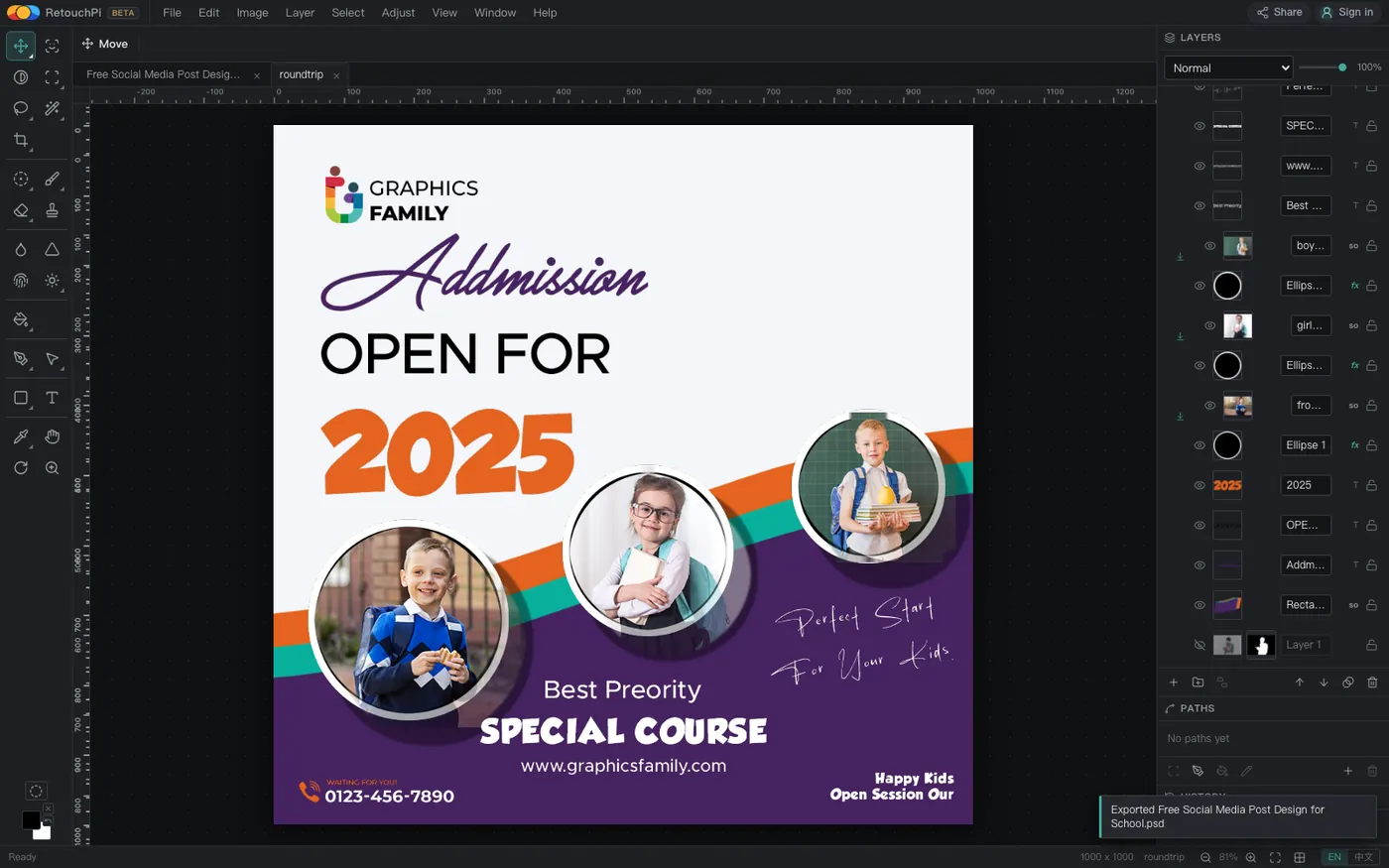
roundtrip. Read back field by field against the PSD container's own header: 29 layer records parse, and the rename token is in the luni field.What you can change once you are in
Handing a file in carries no preset command, so the menu paths are written out verbatim: open is File ▸ Open, and saving layered is File ▸ Save as PSD. The editing in between has no fixed recipe: 54 tools, 10 layer styles, masks and selections live in the toolbar and the Layer menu, while renaming and visibility are clicks straight on the Layers panel.
- Renaming and visibility are on the panel, not in a menu. Select a row and type in the name box; one click switches the eye. Those two are what the round-trip measurement actually changed.
- Masks are where this family of edits lands. The one-click cutout produces a layer mask rather than a new picture, leaving every pixel of the source layer untouched; the mask can still be inverted, feathered or painted by hand.
- Order and grouping change by dragging. Rows drag up and down and into groups, and those relationships are written back with the layer records on save.
The three roads out
There are three roads out and each carries something different; saying which is what beats a bare "exports supported":
- The save carries the structure.
Save as PSDwrites back layers, groups, masks, visibility and names - the 29 records read back above; transparency survives whole only on this road. - PNG / JPEG / WebP carry the picture. All three flatten onto the background colour (alpha = 255 in the corners), which is design rather than fault: they have no layers to hold. This is the road for shipping something to be looked at.
- TIFF and SVG carry the middle ground. TIFF keeps quality for the next step of a pipeline; SVG writes the mask as one
<mask>, which is transparency's exit on the vector side.
PDF at 72 dpi, MP4 / WebM with a long edge up to 1280, slices and artboards are in the export menu too; this page only covers the three roads that concern layers.
What this page explicitly does not claim
Half the value of a capability page is in the word "not". This page does not claim:
- No 16-bit editing. 16-bit PSD and TIFF files open, but they narrow to 8 bits on read; "opens 16-bit files" is true, "edits in 16 bits" is not.
- No PSB or 32-bit opening. Both are refused by name with a reason and the document is left alone - a clear refusal beats a silent failure.
- A transparent PNG export is not on the menu. PNG / JPEG / WebP cannot carry layers, so they flatten onto the background colour; transparency travels only with PSD and SVG.
- No offline claim, and no promise that files never leave the machine. Ordinary retouching - decode, edit, save, export - stays on this machine; AI generation and AI edits are the one step that reaches a server, priced in credits and quoted before you commit.
Questions people ask
How long does a forty-megabyte layered PSD take to open?
292 ms measured, 293 ms on a rerun in the Chinese interface. The sample is 40,082,770 bytes, 1000 x 1000, 26 layer rows and 3 groups; after opening, the tab name and the status-bar dimensions match - it is not a preview first with the rest trickling in.
Is the saved file still layered?
Yes, and not by looking at the interface: the saved file was read back field by field, and its layer and mask section holds 29 layer records (26 layers plus 3 group dividers) that all parse, with the rename token in the luni field. A flattened save cannot produce that record table.
Do groups, masks and visibility survive?
They do. A group lives in the file as an opening record plus a </Layer group> divider - the three records that separate 29 from 26; the row hidden before saving still has no eye icon after reopening; masks are written back with their layer records.
Which files of the PSD family will not open?
PSB (large document) and 32 bits per channel are refused by name, with the reason in the notice and the document untouched. 16-bit files open, but narrow to 8 bits on read.
Does editing send the file to a server?
Ordinary retouching - decode, edit, save, export - stays on your machine; AI generation and AI edits are the one step that reaches a server, priced in credits and quoted before you commit. The open, edit and save on this page belong to the first group and cost no credits.
Does an exported PNG carry transparency?
It does not. PNG / JPEG / WebP flatten onto the background colour, alpha = 255 in the corners; transparency travels with the layers only in PSD, and its vector-side exit is the single <mask> in SVG.
Do I need an account, and is there a watermark?
Neither. Editor features need no account and no subscription, exports carry no watermark, and only AI generation and edits are metered in credits. The editor canvas has no ad slots.
Read next
- Open camera RAWSeven real camera files, measured one by one
- Remove background119 ms, and the result is a layer mask
- ID photoSix named sizes, exported at 300 dpi
- JPEG to PDFOne pixel per point, read back byte by byte
- AI pricingOne credit is one US cent, tier by tier
- CapabilitiesWhat it opens, and what it exports
- Open CMYK filesNine samples opened, 254-261 ms each
- CMYK vs sRGBOne file, two colour spaces, a measurable gap
- Where the ads come fromZero ad slots on the canvas, screen-share maths
- Ad-free editingAd-free is a one-time purchase, not a subscription
- AI editing and layersResults land back on the source layer's rectangle, ±3 px
- Where your file goesEight actions, request lists, zero picture bytes out
Open the editor and read the Layers panel first
No account, no credits. Hand a PSD in and the column at the right is the whole structure of the file: unfold what is folded, click an eye to hide a row. When you are done, File ▸ Save as PSD - and what leaves is still layered.
As an Amazon Associate, we earn from qualifying purchases.