RetouchPi Opens CMYK Files in the Browser: TIFF, PSD, JPEG
What actually happens when you drop a CMYK TIFF or PSD into a browser editor? This page measures it: on 2026-10-09 nine samples (four CMYK, three RGB carrying embedded profiles, two 16-bit) were opened one by one in the bundled Chromium, every open landing in the same 254-261 ms band, none of them stalling. What colour comes out, how far it sits from the naive formula, and on which road an embedded profile gets read - the readings are below, patch by patch. The boundary is on the first screen: this version has no CMYK working mode, it plates nothing, there is no press-proofing step, and exports are sRGB.
Updated 2026-10-10 · ~ 1492 words
Nine samples, opened one by one
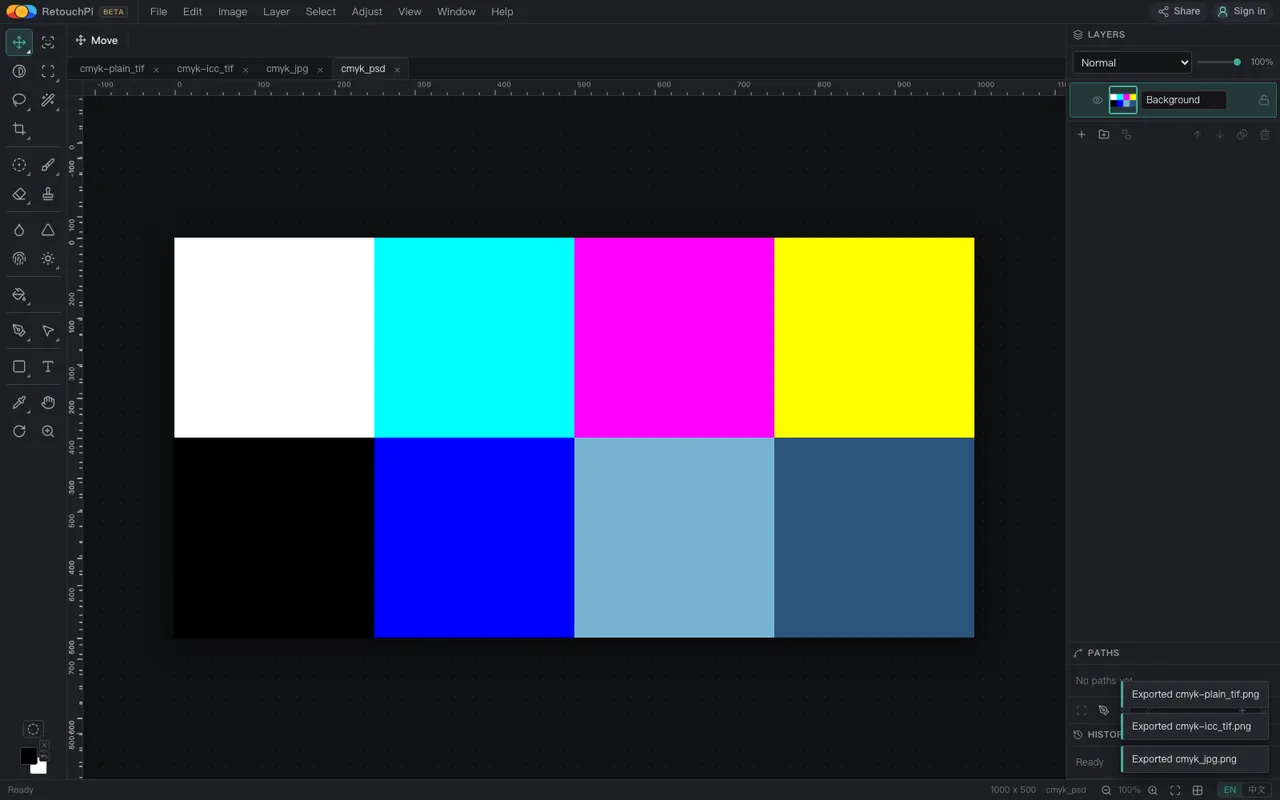
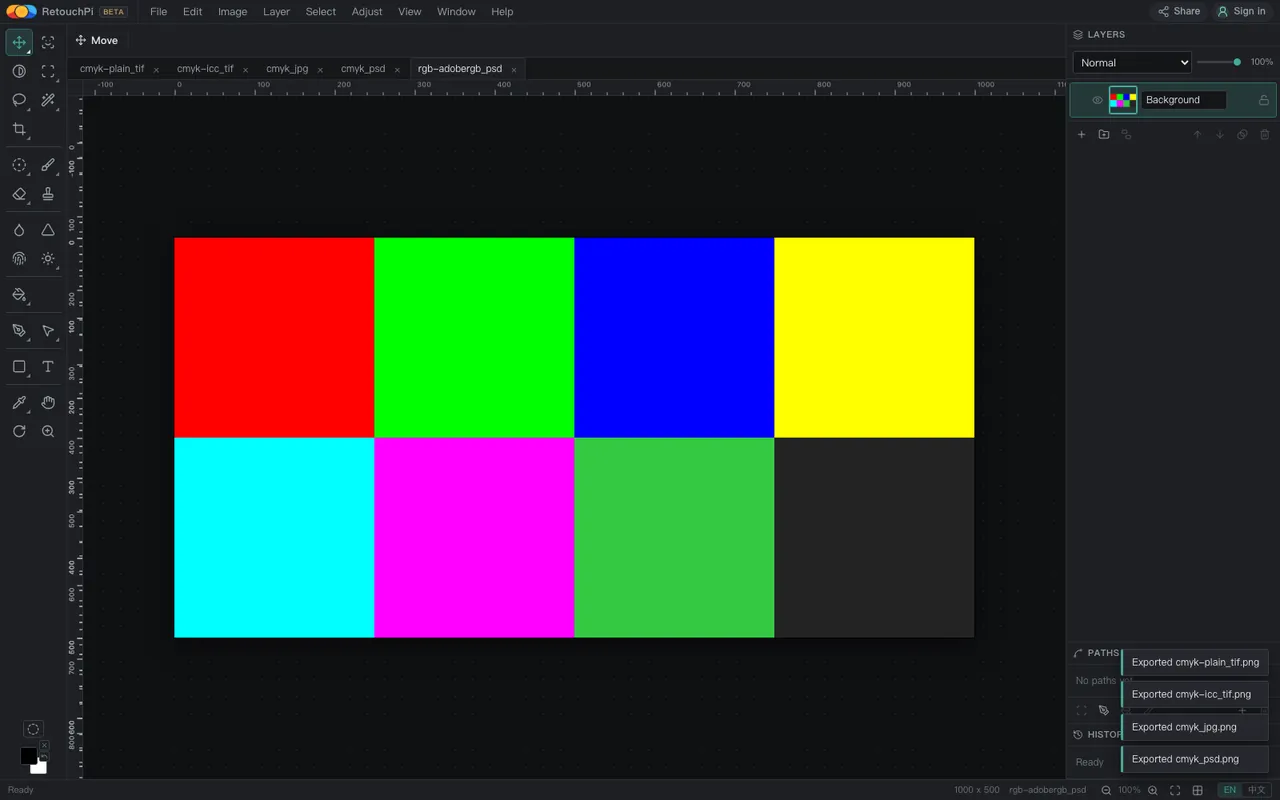
The samples are not pictures found online; a script built them from known pixels: the CMYK one is eight patches (white, cyan, magenta, yellow, black, blue and two mixes), the RGB pair is the same device values with and without an embedded profile, and the 16-bit one is a greyscale ramp. Known pixels are the only way to compute an error; otherwise "looks right" is all you ever get. The open is counted done when the tab label really changes to the new file, not when a budget expires - the first probe fell into exactly that trap and reported two fake 183-second numbers.
| Sample | Shell and colour | What came out |
|---|---|---|
cmyk-plain.tif | CMYK, no embedded profile | All 8 patches identical to the naive formula |
cmyk-icc.tif | CMYK plus an embedded CMYK profile | Byte-identical to the no-profile file; profile ignored |
cmyk.jpg | CMYK, APP14 marker | Platform decode, off by at most 0.65 |
cmyk.psd | CMYK, mode 4 | All 8 patches identical |
rgb-adobergb.psd | RGB plus embedded AdobeRGB(1998) | Identical to the reference transform (dE 0) |
rgb-noicc.psd | Same pixels, no profile | Values passed through untouched |
rgb-adobergb.tif | The same profile in a TIFF | Passed through; the TIFF reader reads no profile |
deep16.psd | 16-bit RGB | Identical to the 8-bit original, patch by patch |
deep16.tif | 16-bit greyscale ramp | Off by at most 0.36 (one grey level) |
Open times: all nine samples landed in 254-261 ms, one band, none stalling. Readings and captures are archived in the 2026-10-09 evidence record.
What colour a CMYK file becomes on the way in
A browser canvas has exactly one road, sRGB, so four CMYK channels must become three first. This version uses the plainest formula there is: R = (255-C) x (255-K) / 255, and the same shape for G and B. Plain does not mean wrong - it is the answer least likely to surprise anyone when no press profile is in play, and the measurement says it is exactly what runs: on the two roads we decode ourselves, PSD and TIFF, the exported eight patches are identical to the formula, patch by patch, dE 0.
The JPEG road is different: a CMYK JPEG (its APP14 colour-transform marker) goes to the platform decoder and then onto the same canvas. The two roads disagree at rounding scale - patch 8's B channel is off by 1/255, a maximum dE of 0.65. What that buys the reader is one claim we can make honestly: changing the shell does not make the colour jump. What we cannot claim is "matches your print shop", because their side runs their own profile and RIP.
Embedded profiles: which road reads them
This is the most useful new fact of the round, and the method is A/B: one set of AdobeRGB(1998) device values saved twice as PSD, with and without the profile, exported and compared. The results differ - the profiled file matches the reference implementation (PIL ImageCms, AdobeRGB to sRGB) patch for patch, dE 0, while reading the raw values as sRGB would be off by up to dE 18.8, the mixed patch (120,200,80) landing at (51,201,67). On the PSD road, in other words, an embedded matrix/TRC-class RGB profile really is applied.
The other two roads need the sentence turned around. CMYK profiles: a TIFF carrying a generic CMYK profile comes out byte-identical to the profile-less one - the profile is ignored entirely, because this version has no CMYK colour management, only the plain formula. RGB profiles in TIFF: the same AdobeRGB profile packed into a TIFF is not read at all; values pass through. So "carrying a profile means being managed" is false here. What is true is narrower: RGB profiles on the PSD road are honoured; CMYK profiles, and any profile in a TIFF, are not.
What this version plainly does not have
No CMYK working mode: there is no CMYK slider, no four-channel editing road. It plates nothing and there is no press-proofing step. Exports are sRGB, every one of them - PNG, JPEG, WebP, PSD, TIFF, PDF, SVG. 16-bit files open, but they narrow to 8 bits on the way in; a deep-bit pipeline is not in this version.
These sentences sit on the first screen rather than the last because they decide who this page is for. Someone holding a CMYK original who wants to look at it, crop it, check its dimensions before sending it to the press: this is enough. Someone who needs to produce press files: this is not that stop, and saying so up front saves both sides an afternoon.
How to check it yourself
- Drop your own CMYK TIFF or PSD into the editor and read the dimensions and pixel count off the status bar against the original file.
- Export a PNG and put it next to the screen preview your press gave you. If the gap is acceptable, this stop is enough; if it is not, ask the shop which profile they run.
- Open a profiled RGB PSD twice: once as-is, once with the profile stripped by any tool. Different colours mean the profile is read on that road; identical ones mean it is not.
- After opening a 16-bit file, export an 8-bit PNG and open it back next to the editor's view. This version narrows on the way in, so the two should look identical - a visible difference would be the bug worth reporting.
What this page does not claim
- No claim of matching press output: their side runs their profile and RIP, ours gives an sRGB preview.
- No CMYK export: all eleven export targets are sRGB or vector masks; not one writes CMYK channels.
- No claim that every browser behaves alike: decoding is a platform gift, and the HEIC family of differences is written up on the capability page.
- No offline claim: the editor is a web page and there is no editor without a network. Ordinary retouching stays on your machine; AI generation and AI edits are the one step that touches a server.
Questions people ask
Will it open CMYK PDF, AI or EPS files?
This page measured three shells - TIFF, PSD, JPEG - across nine samples. Design files (EPS, AI and kin) are a different family: vectors and type need other decoders, and how far they get is written on the capability page, not guessed here.
The opened colour differs from my press preview. Who is wrong?
Most likely neither is wrong: we run the plainest formula there is when no profile is in play, the shop runs their own profile and RIP, and two honest answers can differ. To size the gap, get the shop's profile name; to sign off a colour, the shop's paper proof is the one that counts.
Does a 16-bit file keep its depth once opened?
It does not: the file narrows to 8 bits on the way in. Measured, deep16.psd is identical to its 8-bit original patch by patch, and the deep16.tif ramp is off by at most 0.36 - one grey level of rounding. A pipeline that keeps depth end to end is not this version.
Why are the JPEG and PSD roads off by 0.65?
Two decode roads: PSD and TIFF go through the editor's own decoder while a CMYK JPEG goes to the platform decoder, and each rounds on its own. The disagreement is 1/255 in patch 8's B channel - rounding scale, not colour-management scale. The colour-management number in this round was the 18.8 one.
Read next
- Open camera RAWSeven real camera files, measured one by one
- Remove background119 ms, and the result is a layer mask
- ID photoSix named sizes, exported at 300 dpi
- Edit PSD onlineOpens layered, edit one layer, saves back layered
- JPEG to PDFOne pixel per point, read back byte by byte
- AI pricingOne credit is one US cent, tier by tier
- CapabilitiesWhat it opens, and what it exports
- CMYK vs sRGBOne file, two colour spaces, a measurable gap
- Where the ads come fromZero ad slots on the canvas, screen-share maths
- Ad-free editingAd-free is a one-time purchase, not a subscription
- AI editing and layersResults land back on the source layer's rectangle, ±3 px
- Where your file goesEight actions, request lists, zero picture bytes out
Drop your CMYK original in
The editor is free and takes a dropped file the moment it opens. Read the dimensions off the status bar, export an sRGB preview for whoever has to sign off - those two steps are everything this page measured.
As an Amazon Associate, we earn from qualifying purchases.