Why Free Online Photo Editors Show Ads: RetouchPi Measures It
Why are free online photo editors full of ads? Because the servers, the decoders and the nights spent fixing bugs have to be paid for by someone, and with no subscription the bill lands on display advertising. This page puts two things side by side: what one of the busiest free online editors writes in its own support docs about its ads (5%-15% of the screen, a 300x250 unit on the right side placed multiple times), and what we counted in a real editor on 2026-10-10 (nine ad-slot selectors, zero hits). The screen-share arithmetic is below, and every step of it can be recomputed by hand.
Updated 2026-10-10 · ~ 1575 words
How the free gets paid for
A browser editor can stay alive without charging, provided something else pays. Display advertising is the oldest and most direct answer: ad networks pay per impression and per click, and the product rents out part of its layout. For the reader that model has one direct consequence - part of the screen you are retouching on belongs neither to you nor to the editor, but to whoever is bidding highest right now.
- Servers and bandwidth are a fixed monthly bill: the editor runs on your machine, but the site, the accounts, the assets and the updates need hosting.
- Decoders and development are a one-off cost amortised for years: readers for shells like PSD, TIFF and RAW take months to write once.
- The ads themselves carry support costs: one product wrote four self-help documents about ads alone (ads not showing, being accused of blocking when you are not, malicious ads, how ads are displayed). That count is itself evidence of the search volume behind them.
The numbers that product wrote down itself
One of the busiest free online editors states it plainly in its own support docs: ads may cover between 5% and 15% of the screen; a regular unit is 300x250 px, placed on the right side of the screen, multiple times; when an ad blocker is detected, various JPG images are placed instead of the ads, some asking you to buy its premium tier, some leading to small games. A second article from the same product admits malicious ads have appeared: fullscreen ones, ones that play sound, ones that open a new website without a click - and even a single report can mean that unit was already shown to tens or even hundreds of users.
| Screen | One 300x250 unit | The 5% and 15% band as area |
|---|---|---|
| 1280 x 800 (a common laptop) | 75,000 px², i.e. 7.3% | 51,200 - 153,600 px² |
| 1920 x 1080 (an external screen) | 75,000 px², i.e. 3.6% | 103,680 - 311,040 px² |
| 390 x 844 (a phone, portrait) | 75,000 px², i.e. 22.8% | 16,458 - 49,374 px² |
The third row is the point of the table: one 300x250 unit on a 390 x 844 screen covers 22.8%, already above the upper bound that product wrote for itself. So 5%-15% is a desktop figure; on a phone, a single regular unit has no such headroom.
We counted the editing surface
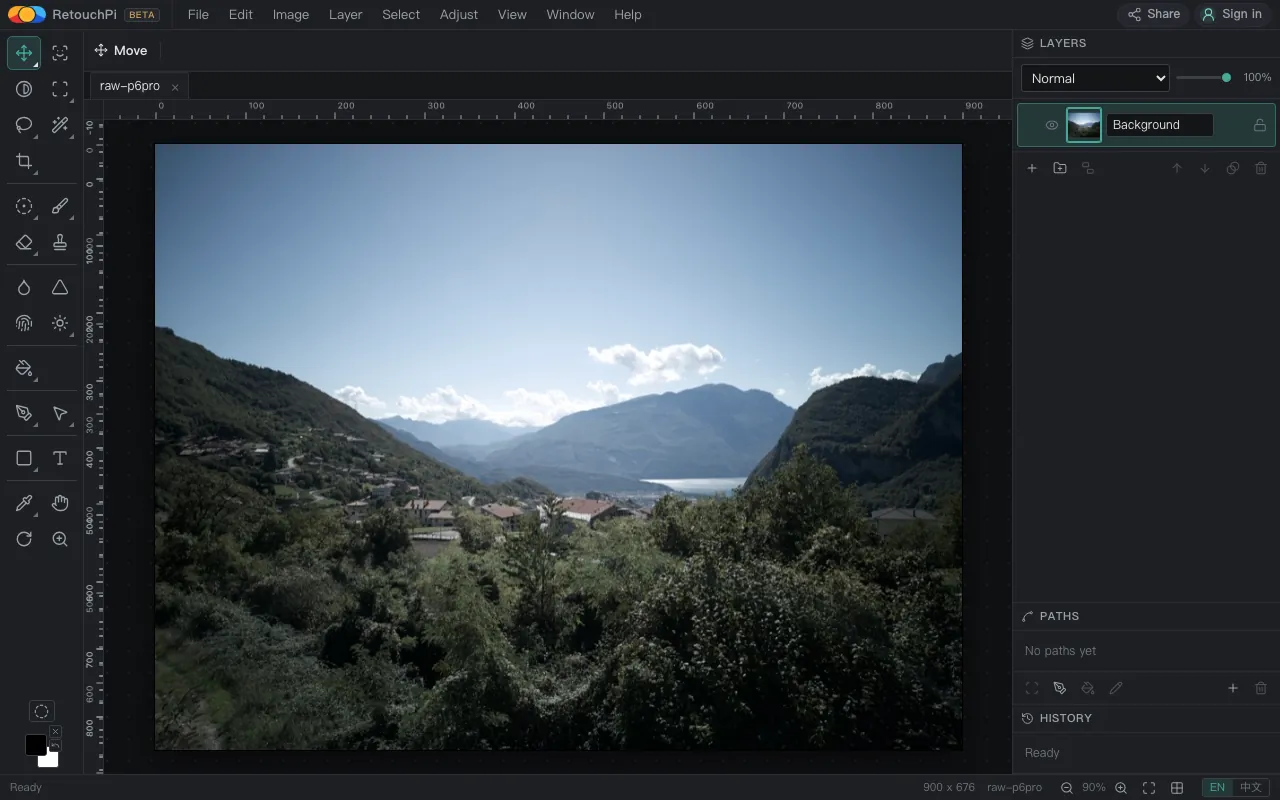
The method is not exotic: on 2026-10-10, in the bundled Chromium at a 1280 x 800 viewport, a real photo (900 x 676) opened for real, and once the canvas had actually painted and the tab label had actually changed to the new file, nine ad-slot selectors were counted in the DOM. Hits: zero. Then the editor's single static page was grepped at the source: adsbygoogle and googlesyndication each appear zero times.
| Selector | Hits |
|---|---|
ins.adsbygoogle | 0 |
script[src*=googlesyndication] | 0 |
script[src*=adsbygoogle] | 0 |
iframe[src*=doubleclick] | 0 |
[id*=google_ads] | 0 |
[class*=adsby] | 0 |
[class*=ad-slot] | 0 |
[data-ad-slot] | 0 |
[data-ad-client] | 0 |
The criterion is not "I glanced and saw nothing": what can be counted in the DOM can be counted by anyone else. The screenshot, the selector list and the viewport size are archived in the 2026-10-10 evidence record.
After the blocker goes on
The most honest paragraph in that product's docs is the blocker one: when a blocker is detected the slot does not stay empty, it is filled with JPGs - some asking you to buy the premium tier, some leading to small games. What the blocker buys, in other words, is not a clean layout but a different content. The reader believes they are blocking ads while actually playing a round of swapped cards with the product, and what comes up next is not known in advance.
Our version has no such round: the editing surface carries no ad slot to begin with, so a blocker finds nothing to block inside the editor and there is no downgrade to fall into. That sentence holds only on the editing surface, though - other pages of the site, including the one you are reading, do carry ad slots, and on those pages a blocker blocks real ads, and blocked means blocked.
What else the reader pays
- The malicious class: fullscreen, playing sound, jumping without a click. One product's support docs admit that behind a single report there can already be tens or hundreds of ruined sessions.
- Layout shift: ad slots arrive at unpredictable times and push the canvas and panels around, so the button you are aiming at can move before your click lands.
- Network: requests to ad domains compete with your editing requests over the same connection, so what slows down is not the ad itself but the few hundred milliseconds you wait for the canvas to answer.
- Privacy: what an ad network learns is which page you were on, how long you stayed and what you clicked - a record that says nothing about your photo and a lot about your habits.
None of these costs are written into the word "free". They are written into the three minutes you spend on an ID photo, a little at a time, with no invoice.
How to check it yourself
- Open the editor and open a photo of your own so the canvas really paints - counting ad slots on an empty canvas proves nothing, because ads often mount only after content appears.
- Open the console with F12 and run
document.querySelectorAllfor each of the nine selectors in the table above, counting the hits. - Filter the network panel by the googlesyndication and doubleclick domains and edit for three minutes, watching whether either domain is ever requested.
- Search the page source for
adsbygoogle: an ad script has to be named in the source to load, so a source without it is a runtime without it.
With all four done, "ad-free" stops being a slogan and becomes a reading you took yourself. It is the same set of moves we ran on our own version, plus one full-screen capture kept as evidence.
What this page does not claim
- No site-wide ad-free claim: the landing page's right rail carries ad slots and the whole column disappears only under the ad-free tier; this very page lives on the site and has its own slots.
- No claim that ads are evil: they are how the free ledger is kept. All we do is open the ledger and let the reader decide whether a clean layout is worth paying for once.
- No claim about other products' numbers: 5%-15% and 300x250 are that one product's own stated figures; we quote them, we do not audit them, and we do not generalise them to every free editor.
- No offline claim: the editor is a web page and there is no editor without a network. Ordinary retouching stays on your machine; AI generation and AI edits are the one step that touches a server.
Questions people ask
Does your editor really show no ads at all?
The editing canvas carries no ad slot, counted in the DOM on 2026-10-10: nine ad-slot selectors, zero hits. Other pages of the site do carry ads, and a one-time ad-free purchase removes them; that tier and the credits are two separate products, and buying one does not change the other.
If it is free, how do you stay alive?
Three things: AI generation and edits metered in credits (1 credit = 1 US cent, quoted before you commit); display ads on the site's pages; and the one-time ad-free purchase. The editor itself charges nothing and carries no subscription.
I run a blocker. Will your editor downgrade me?
It will not. The editing surface has no ad slot to block, so there is no "blocker detected, swap the content" round; this version has no such logic written and nothing to swap in. The real ads on other pages of the site stay blocked when you block them.
Is the 5%-15% figure yours?
It is not. It is the figure one of the busiest free online editors writes in its own support docs; we quote it and do not audit it. What we measured is our own side: nine selectors, zero hits, with a full-screen capture archived.
Read next
- Open camera RAWSeven real camera files, measured one by one
- Remove background119 ms, and the result is a layer mask
- ID photoSix named sizes, exported at 300 dpi
- Edit PSD onlineOpens layered, edit one layer, saves back layered
- JPEG to PDFOne pixel per point, read back byte by byte
- AI pricingOne credit is one US cent, tier by tier
- CapabilitiesWhat it opens, and what it exports
- Open CMYK filesNine samples opened, 254-261 ms each
- CMYK vs sRGBOne file, two colour spaces, a measurable gap
- Ad-free editingAd-free is a one-time purchase, not a subscription
- AI editing and layersResults land back on the source layer's rectangle, ±3 px
- Where your file goesEight actions, request lists, zero picture bytes out
Open your photo and count
The editor is free and takes a dropped file the moment it opens. Once it is up, run the four checks above: count the selectors in the console, watch the ad domains in the network panel, search the source, then open the landing page once more for the right rail. All four readings become yours.
As an Amazon Associate, we earn from qualifying purchases.