RetouchPi Opens Camera RAW: DNG, NEF, ARW and RAF, Tested
Camera RAW is not one format; it is forty-one. Nothing here is guessed: on 2026-10-09 seven real camera files were opened one after another in the same browser, and the timings, the pixels that came out, and what it said when one would not open are all recorded below - including the one that was refused by name.
Updated 2026-10-09 · ~ 1746 words
Hand it the RAW file
Pick one and you land in the editor - no account, no credits up front. Extensions like .dng .nef .arw .raf .cr2 .orf .rw2 are all allowed through the file picker, forty-one of them in total.
Four steps, start to finish
- Pick the RAW file in the well at the top of this page, or inside the editor use File ▸ Open (Ctrl+O).
- Wait for the result. The three roads differ by two orders of magnitude: a real develop shows a percentage bar and takes seconds to tens of seconds, the camera's own preview takes a few hundred milliseconds, and a file that will not open is refused immediately with a named reason.
- Read the notice. Both the preview road and the refusal say so out loud instead of quietly handing you a picture that is not what you asked for - you should know which one you got.
- Then take it out: File ▸ Export TIFF to keep the quality,
Export JPEGorExport WebPto ship it,Save as PSDto keep it layered for next time.
There are only three roads into a RAW file
A browser has no maker's decoder, so a RAW reader can only take one of three roads. The difference is not speed; it is whether what you get is the data that came off the sensor.
- It develops the file itself. DNG is an open container, so the sensor data can be read directly: the demosaic, the white balance and the tone curve are all computed here, and what you get is a picture derived from the sensor. All three measured DNG files took this road, including Apple ProRAW from an iPhone, which is a DNG.
- It falls back to the camera's own preview. RAF, NEF and ARW are proprietary containers: the sensor data cannot be read, but the camera wrote a full-size processed JPEG into the file when it shot. The editor lifts that one out and tells you, in the same moment, that it is a preview - with the dimensions.
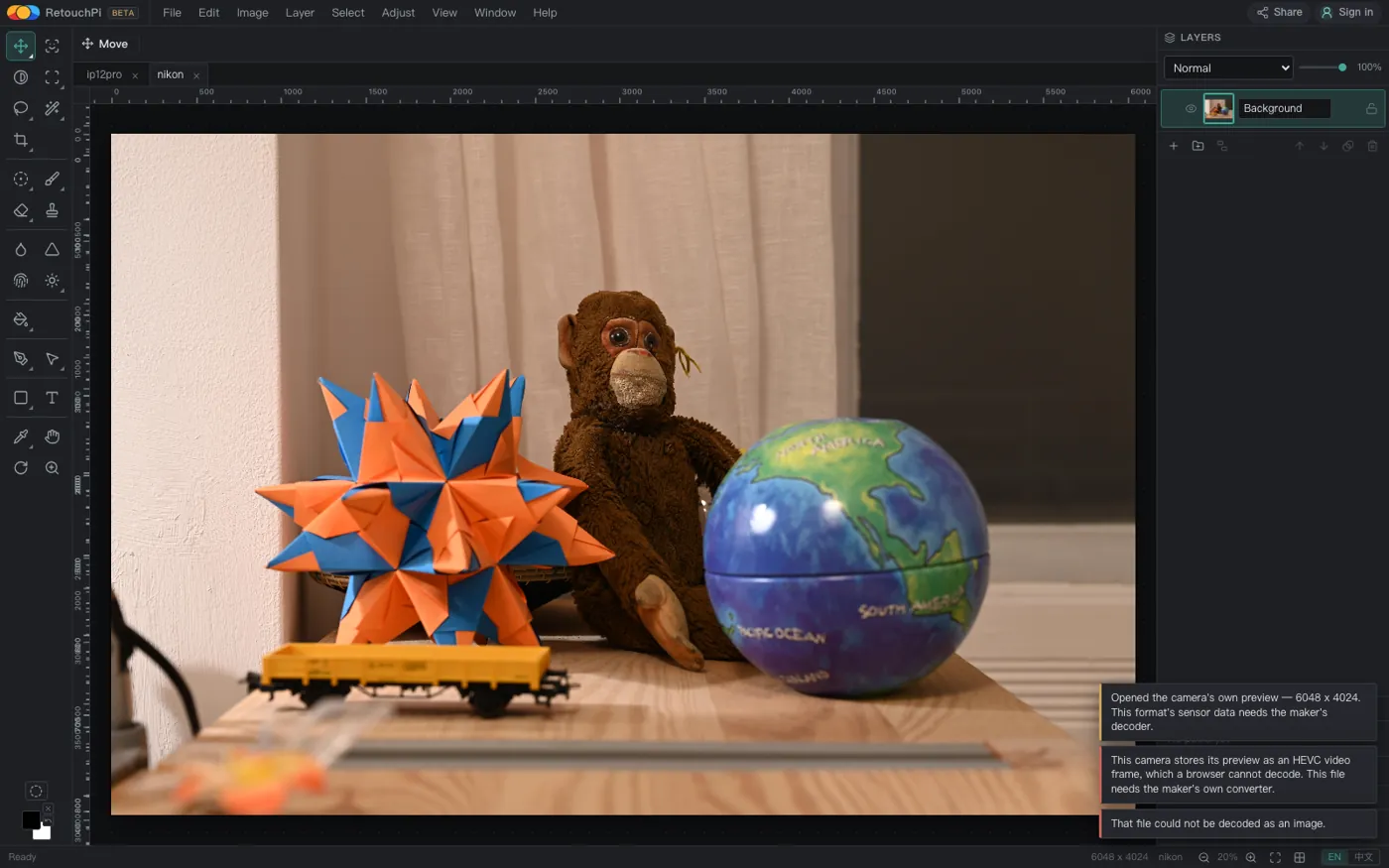
- It refuses, by name. A CR3 keeps its preview as an HEVC video frame, which a browser image decoder cannot read. You do not get an empty canvas and it does not guess: the reason goes into the notice and the document is left exactly as it was.
Every timing and every pixel count below was measured on 2026-10-09, on one machine, in one bundled Chromium, run back to back - not copied out of a spec sheet.
Seven real camera files, one by one
| File | Time | Road taken | Pixels out |
|---|---|---|---|
ip12pro.dng (Apple ProRAW) | 2547 ms | Developed itself, no notice | 4032 x 3024 |
p6pro.dng | 2784 ms | Developed itself, no notice | 4064 x 3056 |
p8pro.dng | 10820 ms | Developed itself, no notice | 8144 x 6128 |
fuji.raf | 262 ms | Camera preview + named notice | 4416 x 2944 |
nikon.nef | 266 ms | Camera preview + named notice | 6048 x 4024 |
sony.arw | 260 ms | Camera preview + named notice | 1616 x 1080 |
canon.cr3 | 262 ms | Refused by name, document untouched | — |
Time is measured from picking the file to pixels on the canvas. The 8144 x 6128 DNG is about 50 megapixels, the largest of the seven, and it took 10.8 s to develop; the canvas ceiling is 64 megapixels and 30000 px on the long side, so it still fits.
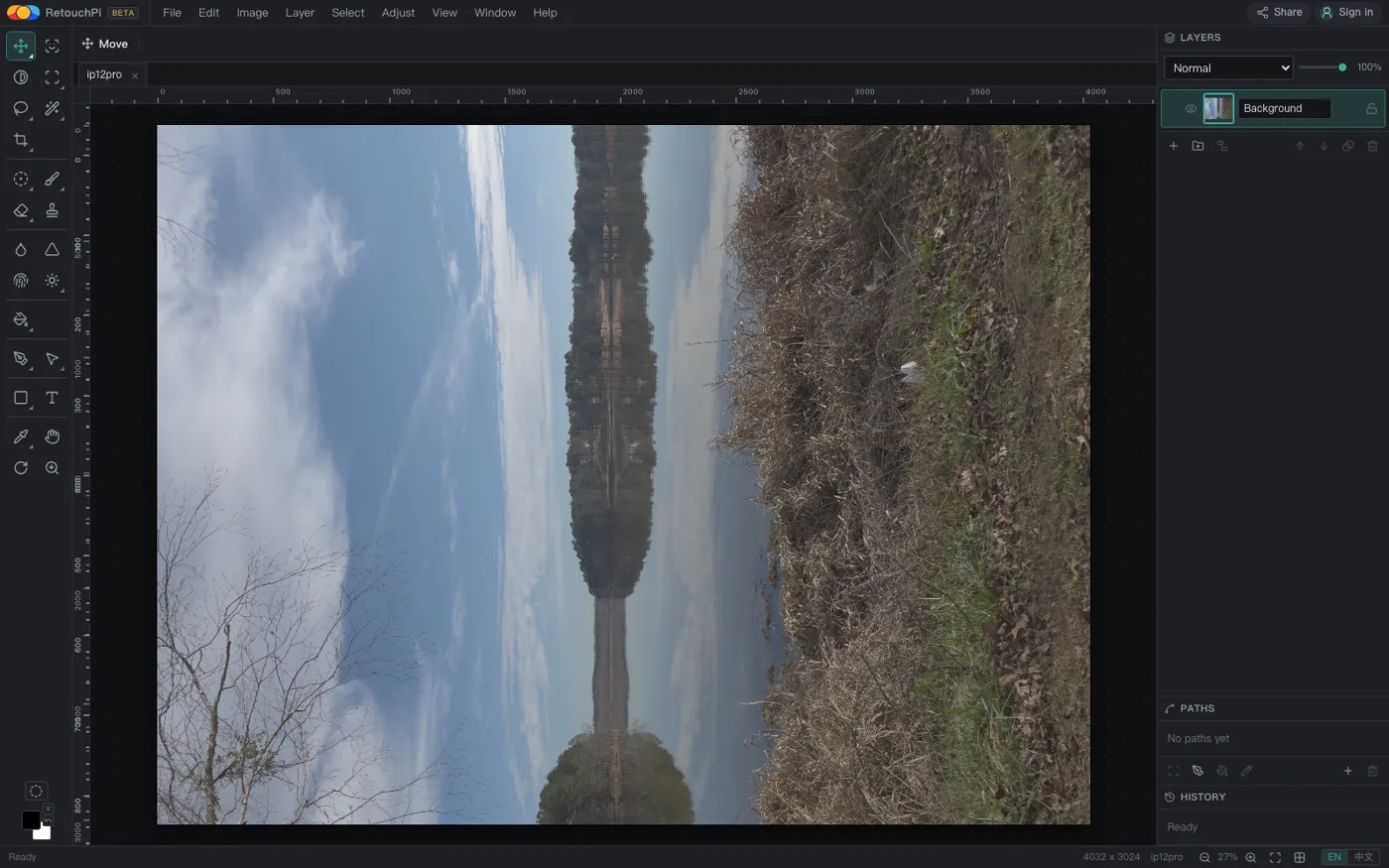
ip12pro.dng on the canvas after 2.5 s, at sensor dimensions, with no notice - because it read the real data.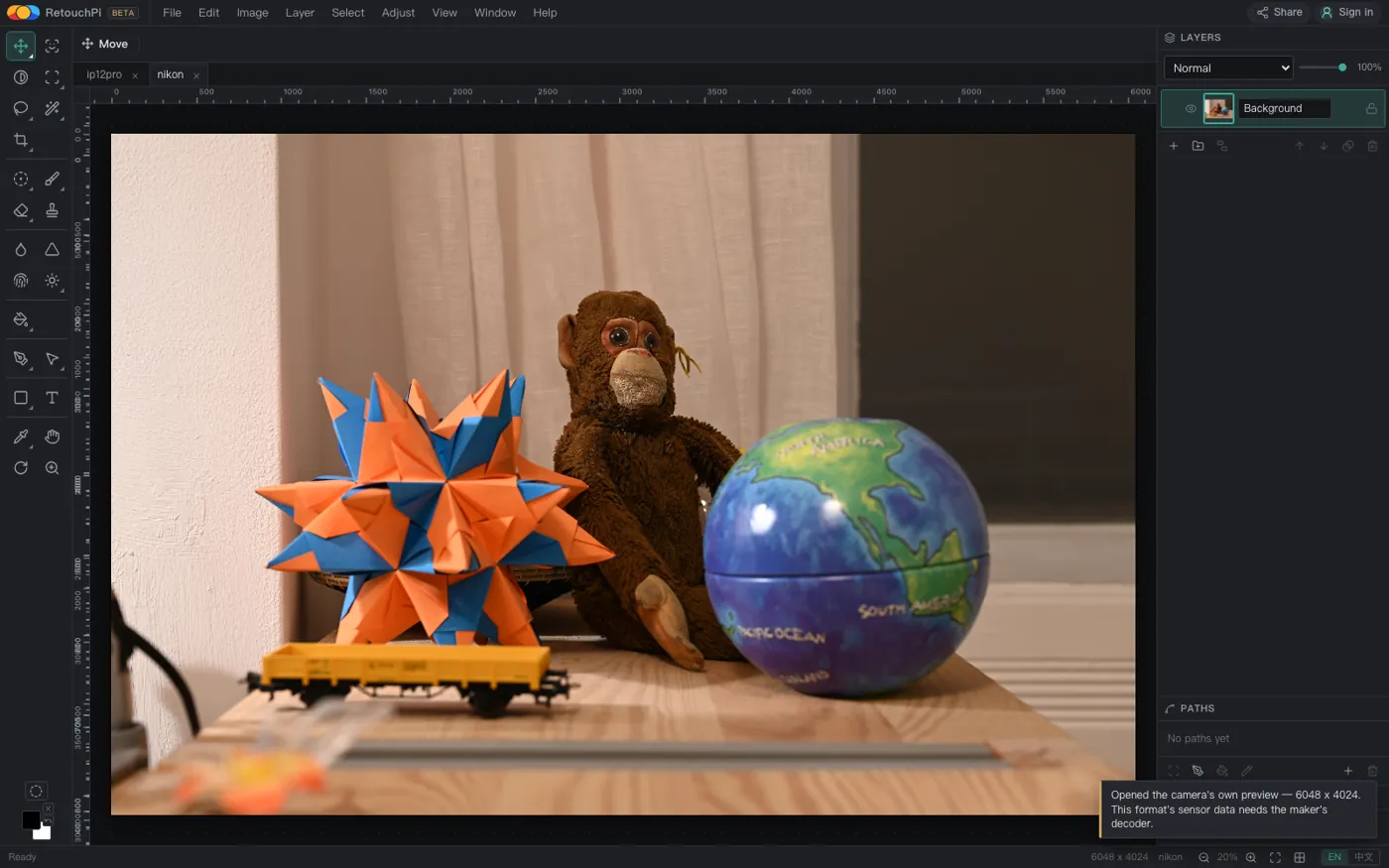
What the embedded preview actually is
On the second road you do not get undecoded sensor data; you get the picture the camera already computed: full size, demosaic done, the body's white balance and tone curve applied. The pixels are real - 6048 x 4024 is 6048 x 4024 - but the colour is the camera's decision, not something you can recompute from the raw data.
- What you can do: crop, curves and levels, local work, layers and masks, type, export - everything you would do with a full-size picture, and it is already the colour the camera itself endorsed.
- What you cannot do: redo the demosaic, change the white balance and still recover detail in the highlights, or pull back shadows two stops under. Those need the sensor data, and the sensor data needs the maker's decoder.
- How to tell: the notice says so. No notice means it developed the file; a notice about the camera's own preview means the second road; a notice with a reason means it was refused. In none of the three do you have to guess.
Falling back to the preview is not a failure; it is the ceiling of what a browser can do. It is written down here because it decides whether that file is a negative or a deliverable - as a deliverable it is enough, as a negative it is not one.
Once it is open, it is an ordinary document
A RAW file has no special status once it is open: it is a bitmap document, and the rest of the editor makes no exception for it. Fifty-four tools, layers and layer groups, masks and channels, curves through to levels, ten layer styles, and up to 256 undo steps.
- The 50-megapixel DNG does not have to be scaled down before you can work on it: the canvas ceiling is 64 megapixels and 30000 px on the long side.
- To keep it layered, use File ▸ Save as PSD: it writes layered, and masks, blend modes and layer styles all travel with it.
- To keep the whole unflattened history, save the project file (File ▸ Save Project, Ctrl+S).
The eleven ways to take it back out
Every export lives in the File menu, grouped by what the file is: image, vector and page, video, layout. A RAW file mostly uses the first two - TIFF to keep the quality, JPEG and WebP to ship it, PDF for a single page, PSD to save it back layered.
The colour position, stated plainly: exports are sRGB at 8 bits per channel. 16-bit PSD and TIFF files open, and narrow to 8 bits on the way in; this version has no CMYK working mode, produces no plates and has no press-proofing step - a formal four-colour print job is not what it is for.
What this page does not claim
- CR3 will not open. The notice is quoted above: the preview is an HEVC video frame and a browser image decoder cannot read it. For that file, start with the maker's own converter.
- It does not decode proprietary sensor data. NEF, ARW and RAF go through the embedded preview, and this page does not pretend that is a develop.
- PSB and 32-bit files are refused by name, not silently dropped.
- HEIC is a different matter. It is not a RAW file, and whether it decodes depends on the platform the browser runs on: WebKit-based browsers decode it at full size, while desktop Chromium builds (Chrome included) say by name that they have no HEVC decoder.
- There is only one privacy sentence here: ordinary retouching - decoding, editing, exporting - stays on your machine, and AI generation and AI edits are the only step that reaches a server.
Questions people ask
Is my NEF opening as the original, or as the camera preview?
The camera preview, at full size. The notice reads: "Opened the camera's own preview - 6048 x 4024. This format's sensor data needs the maker's decoder." The pixel count is real; the colour is the body's.
How long does a DNG take to develop?
It depends on the pixel count. Measured: 2.5 s for 4032 x 3024, 2.8 s for 4064 x 3056, and 10.8 s for 8144 x 6128, about 50 megapixels. A percentage progress bar runs while it develops; it is not a blank wait.
Why will my CR3 not open?
That camera stores its preview as an HEVC video frame, which a browser image decoder cannot read. The editor tells you exactly that and leaves the document alone - it will not hand you an empty canvas and pretend. Such a file needs the maker's own converter first.
Does it open RAW from a phone?
Apple ProRAW from an iPhone is a DNG, so it takes the develop road: measured at 2547 ms for 4032 x 3024. A DNG from an Android phone behaves the same. A phone's proprietary format is not in that group.
Does opening a RAW file send it to a server?
Ordinary retouching - decoding, editing, exporting - stays on your machine. AI generation and AI edits are the only step that reaches a server, priced in credits and quoted before you commit. Opening a RAW file belongs to the first group.
Is the exported TIFF 16-bit?
No: exports are sRGB at 8 bits per channel. 16-bit PSD and TIFF files open, and narrow to 8 bits as they come in - which is why this page never leads with bit depth: there is no high-bit-depth pipeline in this version.
Were all forty-one extensions tested?
No. Seven files were measured: three DNG, one each of RAF, NEF and ARW, and one CR3. The rest are on the allow list (matched by extension, not MIME), and the outcome falls into three groups by container: an open container develops, a proprietary one usually falls back to the embedded preview, and one whose preview cannot be decoded is refused by name with the reason.
Read next
- Remove background119 ms, and the result is a layer mask
- ID photoSix named sizes, exported at 300 dpi
- Edit PSD onlineOpens layered, edit one layer, saves back layered
- JPEG to PDFOne pixel per point, read back byte by byte
- AI pricingOne credit is one US cent, tier by tier
- CapabilitiesWhat it opens, and what it exports
- Open CMYK filesNine samples opened, 254-261 ms each
- CMYK vs sRGBOne file, two colour spaces, a measurable gap
- Where the ads come fromZero ad slots on the canvas, screen-share maths
- Ad-free editingAd-free is a one-time purchase, not a subscription
- AI editing and layersResults land back on the source layer's rectangle, ±3 px
- Where your file goesEight actions, request lists, zero picture bytes out
Try it with your own file
No account and no credits needed. The seven timings above are the range you will see: a develop takes seconds to tens of seconds depending on the pixel count, a preview takes a few hundred milliseconds, and the kind that will not open says why immediately.
As an Amazon Associate, we earn from qualifying purchases.